Count calories with one photo
Snap your meal and get calories and macros in seconds. Wrong? Fix it in one sentence — the numbers really recalculate.

You've tried tracking before — weighing everything, typing in every ingredient
It works… until it doesn't.
Not because you stopped caring — logging by hand is just too much work. And if you're not tracking, you're not losing weight.
Bocco is for anyone who's quit calorie counting because it was too much work.Tracking that finally fits your life
Simple enough to keep — and keeping it is what gets results.
Snap, don't type
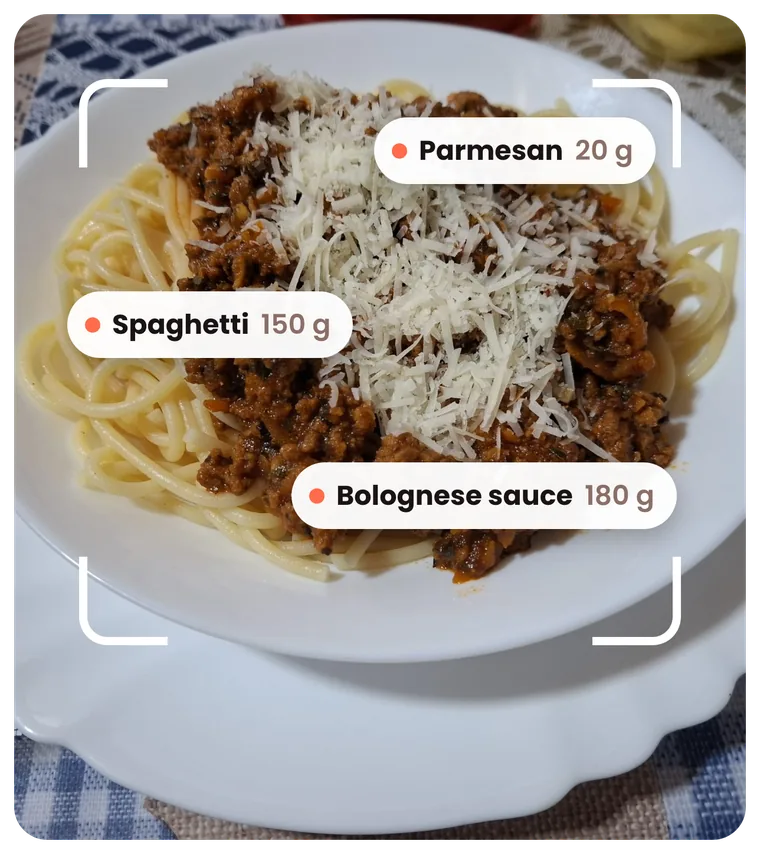
Calories and macros from a photo in seconds. No weighing, no searching through food lists.
Fix it in one sentence
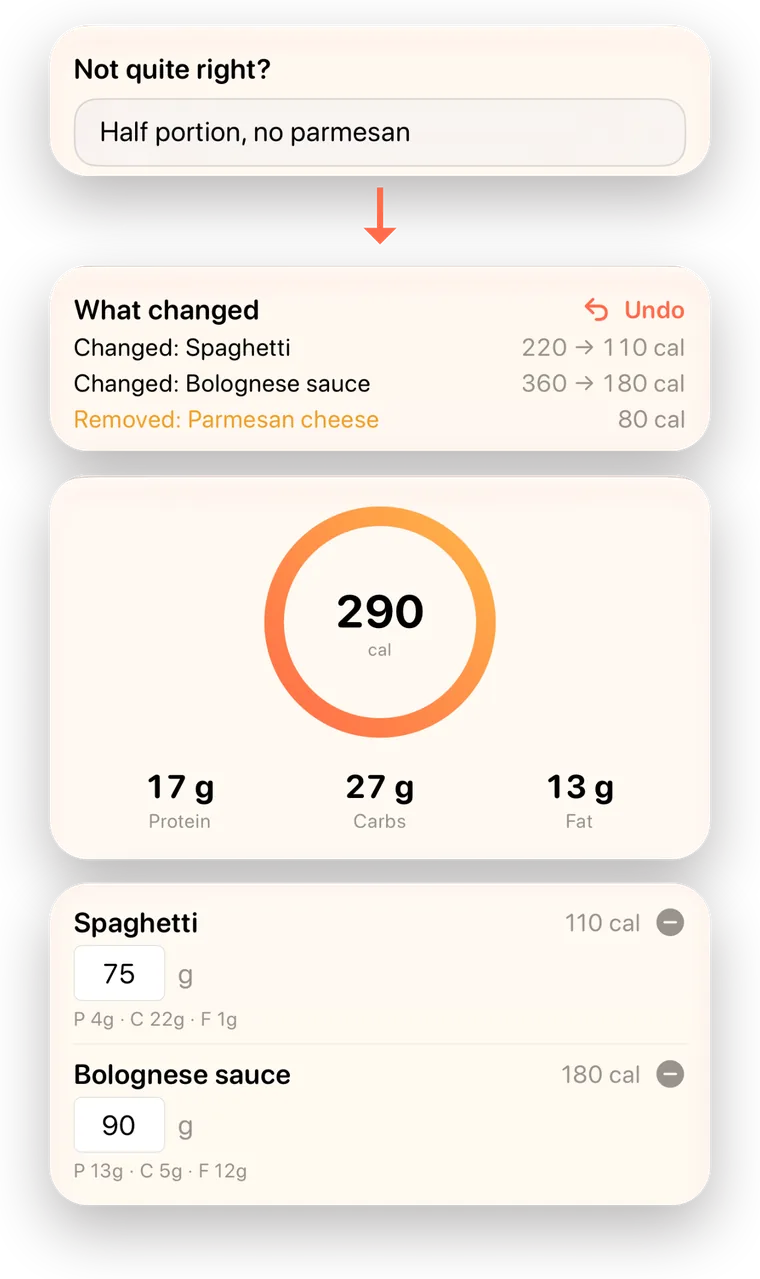
"Half portion, no parmesan." The numbers recalculate — not just the label.
Log once, reuse forever
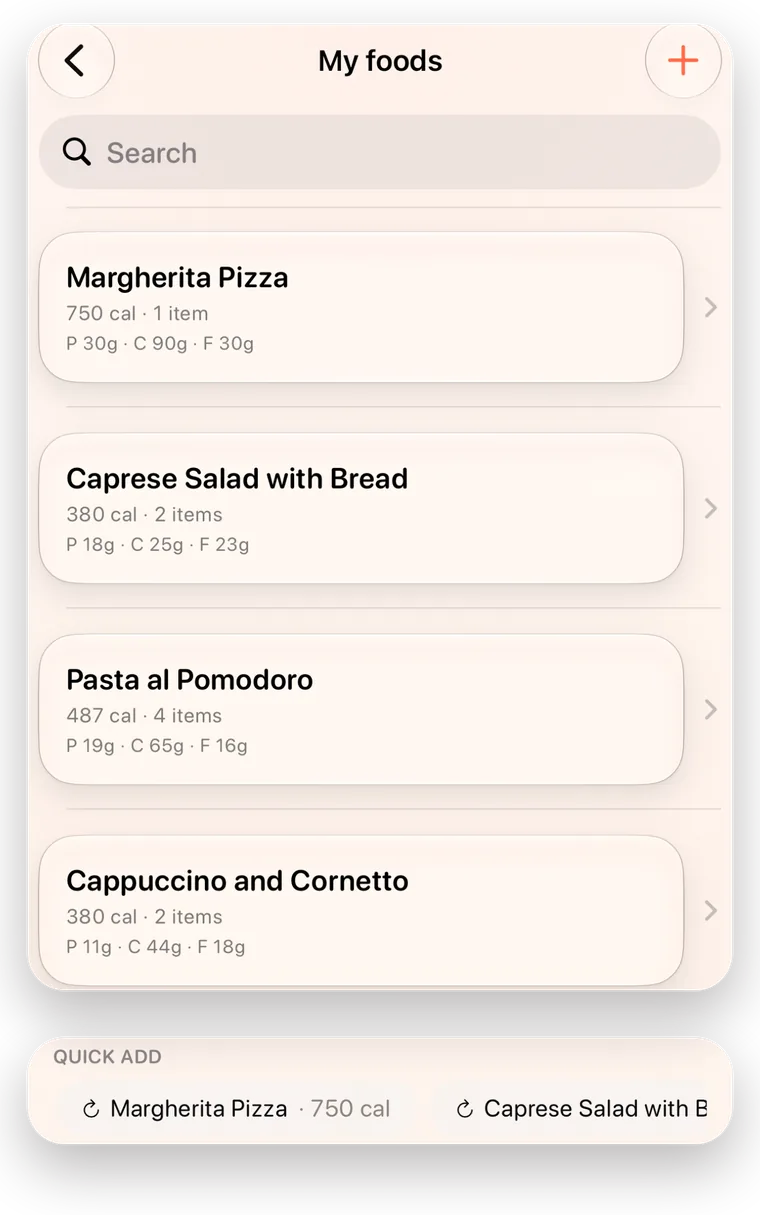
Your go-to meals come back in a tap — no re-scanning the same lunch.
Your whole day at a glance
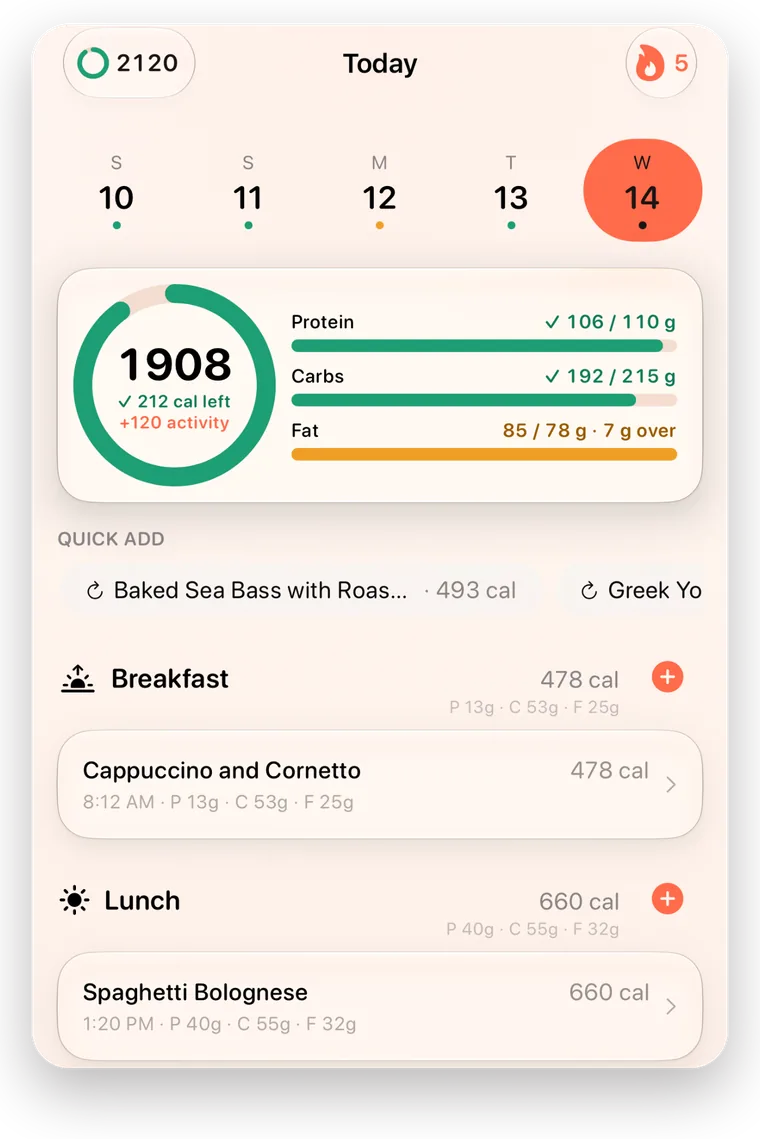
Calories left, macros, your week and your weight trend — so you always know where you stand.
How it works
From the first photo to the number on the scale
Snap it
Photograph the plate. Bocco names each food, estimates the portion and gives you calories and macros in seconds. No photo? Describe the meal in a sentence, or scan a nutrition label.
Wrong? Fix it in one sentence
Say what's different — "half portion, no parmesan" — and Bocco recalculates every number: 660 becomes 290 here, with each change listed.
Your whole day, at a glance
Calories left, protein, carbs and fat, your week and your streak. Green when you're on target — and nobody's perfect, so the pizza night is just one amber dot.
Usual meals, one tap away
Save a meal once and it's there every time — in My foods and in Quick add right on the diary. Same lunch as yesterday? Logged in seconds.
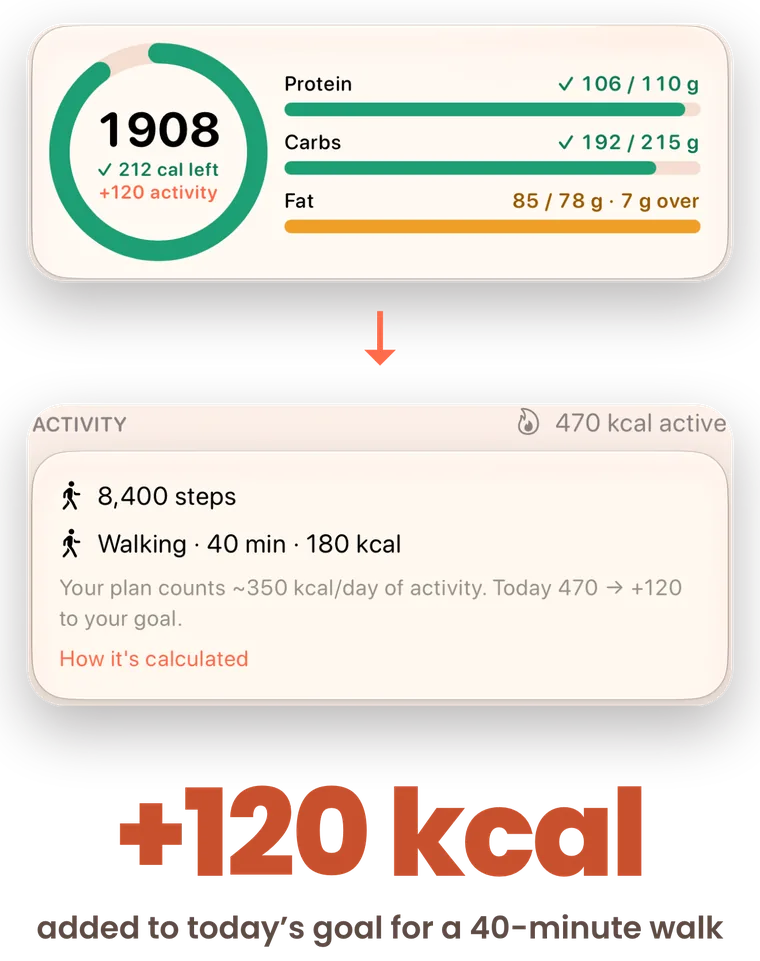
Workouts earn you more food
Connect Apple Health and on days you move more than your plan expects, your goal goes up — here a 40-minute walk added 120 kcal. Optional, and you can keep the goal fixed.
Stay on track to your goal
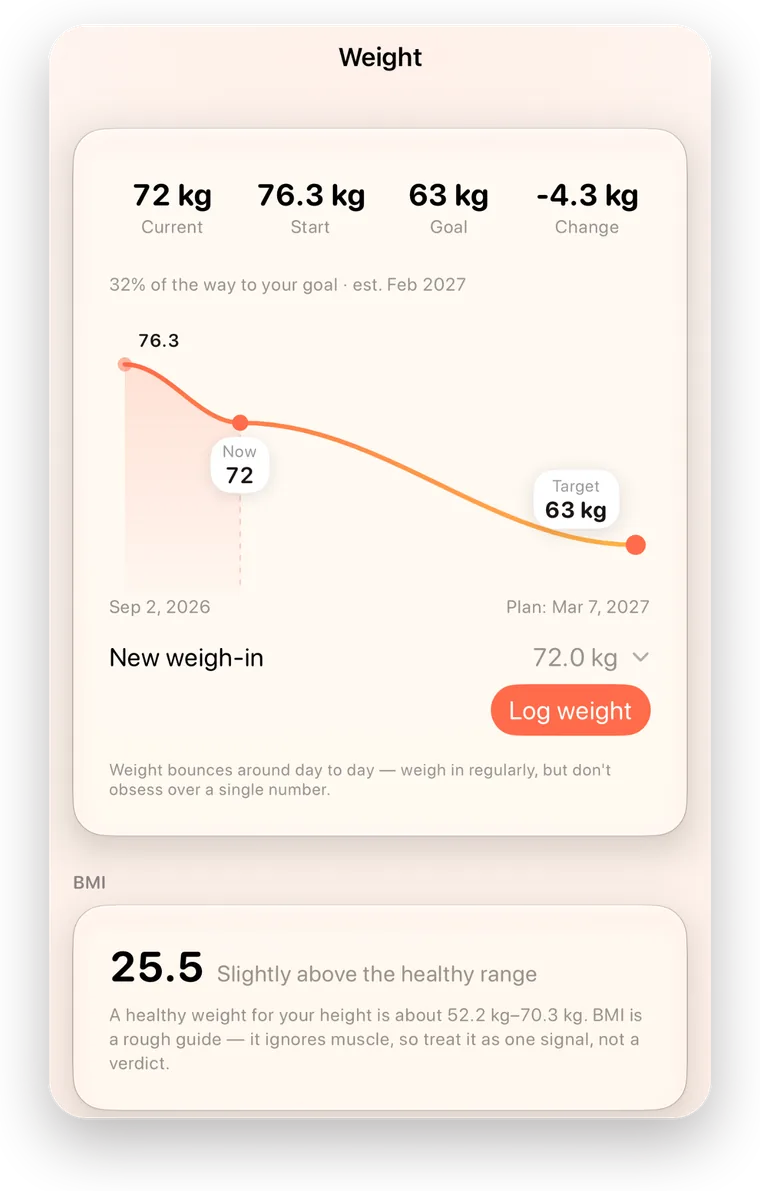
Your weight trend against your plan, the date you'll get there and your BMI — week by week, kind and clear.
Log it any way you like
Why people keep logging
In their own words
Finally, I believe I'll actually lose weight.
Gio · Bocco userI had no idea how much I was really eating.
Sofia · Bocco userI even spend less eating out now.
Matteo · Bocco userThe easiest app for counting calories.
App Store reviewFrom app to full nutrition breakdown/record = 10 seconds.
App Store reviewQuestions, answered
The things people ask before their first scan
How does Bocco count calories from a photo?
Snap your meal and Bocco's AI recognizes each food and its portion, then gives you calories, protein, carbs and fat in seconds. You can also describe the meal in a sentence, or scan a nutrition label.
Is Bocco free?
You can try it for free: your first scans are on us, and the subscription starts with a 7-day free trial, full access. After that it's $9.99/month or $39.99/year (prices vary by region). Cancel anytime in your App Store settings.
How accurate is the AI?
Honestly: photo estimates are close, not gram-perfect — that's true of every AI calorie counter. What gets results is tracking consistently, and where Bocco differs is corrections: tell it "half portion, no parmesan" and it recalculates the numbers — it doesn't just relabel the dish.
Do I have to weigh my food?
No. Bocco estimates portions from the photo. If a portion looks off, fix it in one sentence or tweak the grams — the totals update instantly.
Does Bocco work with Apple Health?
Yes, if you want it to. Connect Apple Health and on days you move more than your plan expects, your steps and workouts raise your calorie goal. You can also keep the goal the same every day.
How is my daily calorie target calculated?
With the Mifflin-St Jeor equation, the standard formula nutrition professionals use, based on your body, goal and pace — never AI guesswork. Your target and macros update as your weight changes.
Which devices and languages does Bocco support?
Bocco is an iPhone app, available on the App Store in English and Italian (the app itself also speaks Russian). Android isn't available yet.
New to calorie counting? Start with our beginner's guide on how to count calories.
Tracking this simple is tracking you'll actually keep — and that's what gets results
Try it free — download Bocco on the App Store